


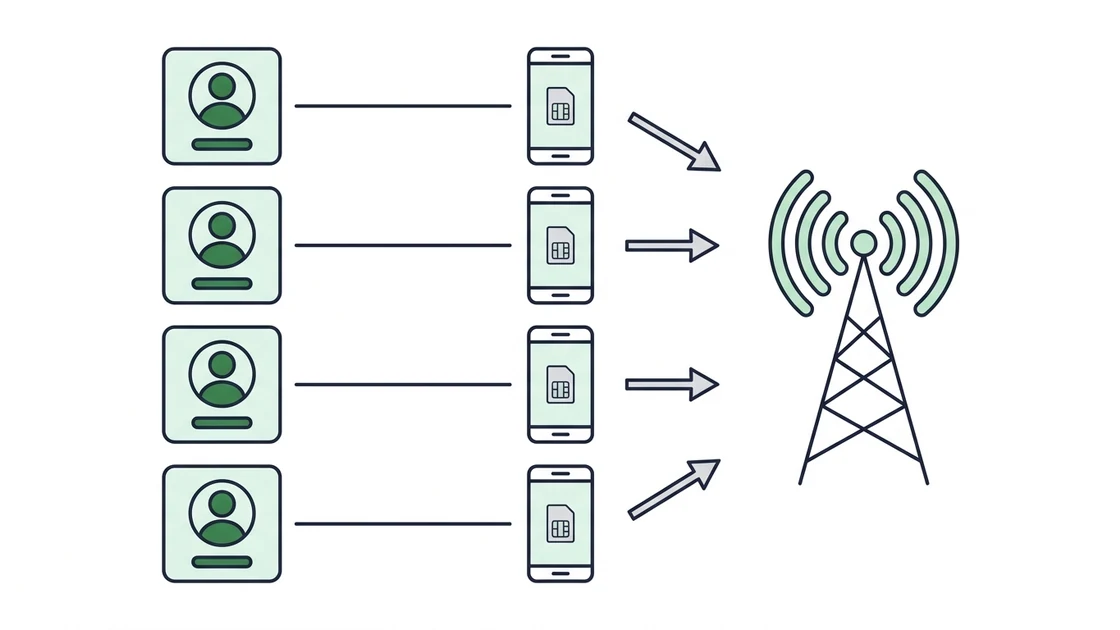
Instagram does not ban you for using a proxy. It bans you for looking like one operator running many identities — and the IP is the cheapest evidence it has. A mobile proxy breaks that evidence because a single carrier IP is shared, through CGNAT, by thousands of genuine subscribers at once. Blocking it would take paying phone customers down with you, so moderation applies far softer thresholds. Everything below is built around that asymmetry — and around its limits, because the IP is only half of what Instagram measures.
Why Instagram bans accounts that share one IP
Instagram does not evaluate accounts one at a time. It builds a graph of which accounts share a signal, and the strongest edges are cheap, durable identifiers: exit IP, device fingerprint, cookies, recovery emails, phone numbers, payment instruments. When several accounts share enough edges the platform treats them as one operator — which is why bans arrive in clusters, four accounts in an afternoon rather than one a month.
The IP is the edge you can actually control, and the one most people get wrong. Logging into eight accounts from one home connection creates eight nodes on a single residential address — a pattern no ordinary household produces. A datacenter proxy is worse: the ASN is published and already associated with automation, so a fresh account on it can be checkpointed before it posts anything. The general mechanics are covered in managing multiple accounts safely and the cross-platform view in social media multi-accounting. This page is the Instagram-specific version, because Instagram enforces harder than TikTok or X and punishes geography mismatches other platforms ignore.
Does a mobile proxy for Instagram actually work?
Yes, for the specific problem it solves — and it is worth being precise about which problem that is. A mobile proxy makes your exit address indistinguishable from a normal phone user's. It does not make your behaviour look human, and it does not repair a browser fingerprint that is identical across twenty profiles.
The mechanism is carrier-grade NAT. Mobile networks have far fewer public IPv4 addresses than subscribers, so one public address — an EE address in the UK, a T-Mobile address in the US — is multiplexed across hundreds or thousands of handsets at once. Instagram therefore cannot use a mobile IP as proof of anything: two accounts on the same carrier address is an everyday coincidence, not evidence of a farm. Banning it would take out real subscribers across a metro area, so the platform reserves hard IP-level action for extreme cases and leans on behaviour and fingerprint instead.
That is the whole of the advantage — mobile IPs move you from a conclusive signal to an ambiguous one, which is why Proxy4G addresses read as a 100% trust score on the reputation services anti-fraud vendors use. For the packet-level version see how mobile proxies work.
Instagram proxies compared: mobile, residential, ISP and datacenter
| Proxy type | How Instagram reads the IP | Rotation model | Verdict for Instagram |
|---|---|---|---|
| Mobile 4G/5G | Carrier ASN, NAT-shared by thousands of real handsets — ambiguous by construction | On demand, or on a 1–60 min timer (dedicated); every 5 min (shared) | Best fit — the only type where a shared address is normal |
| Residential | Real ISP address, but usually one household — two accounts on it is already unusual | Per-request or sticky session, provider-controlled | Workable, degrades as the pool is resold |
| ISP / static residential | Residential ASN on datacenter hardware; stable but never moves | None — the address is fixed | Usable for one account, no recovery path after a flag |
| Datacenter | Hosting ASN, published and widely blocklisted | Per-request from a known range | Avoid — often flagged before the first post |
The second column is the one that matters: mobile is the only category where several accounts sharing an address is genuinely common, and therefore the only one where sharing is not by itself evidence. Longer form: mobile vs residential vs datacenter proxies.
How many Instagram accounts can you run per mobile proxy?
For anything you would be upset to lose: one account per dedicated IP. That mapping is the most defensible footprint available — one identity, one address, one fingerprint, indefinitely — and the rest of this page assumes it.
Nobody can give you an honest higher number, and you should treat any source that does with suspicion. Instagram publishes no per-IP threshold, enforcement is adaptive rather than a fixed rule, and tolerance shifts with account age, geography and activity. What can be said is directional: a few genuinely read-only accounts behind one shared rotating address is a normal-looking pattern, while five accounts that all post and follow from one address is not, however good the IP is.
The policy that follows is a promotion ladder. Register and warm in bulk on a shared rotating plan at $10.80/mo, accept that some will not survive verification, then move every survivor onto its own dedicated line at $27/mo before it holds value. Paying $27 to protect an account that took three weeks to warm is the easy call; the mistake is leaving it on a rotating IP because it still works today. The same ladder applies to bulk account creation.
Dedicated or rotating: which plan for Instagram, and when
Instagram is a session-holding platform, not a request-volume platform, and that decides the plan. A logged-in account is expected to return from a stable address; if the exit IP changes mid-session, or changes city between logins, you generate exactly the anomaly the system watches for.
The dedicated plan gives you an exclusive port nobody else touches. You hold a stable address as long as you want one, and rotate on demand or on an automatic 1–60 minute timer when you genuinely need a fresh address — for Instagram, rotation is a recovery tool, not a hygiene habit. The shared plan rotates every 5 minutes and cannot be pinned: right for scraping and registration bursts, wrong for an account you intend to keep. Rotating vs dedicated proxies works through the trade-off without the Instagram framing. Both run on 1, 3, 6 or 12-month terms, with longer terms lowering the effective monthly rate.
Which country and carrier to pick for Instagram accounts
Pick the country your account claims to be in, then stop optimising. The proxy country should agree with the registration phone number, the browser timezone and the audience. A US-registered account appearing from Germany on Tuesday and the US on Thursday is a far stronger negative signal than a slightly slower connection.
Proxy4G stocks 18 countries and 43 carriers. For the four most requested Instagram markets that means United States on AT&T Wireless, T-Mobile USA, T-Mobile 5G or Verizon; United Kingdom on EE, Three or Three 5G; France on Orange, SFR, SFR 5G, Bouygues Telecom or Free Mobile; and Germany on Telefonica O2 or Vodafone 5G. Spain, Italy, the Netherlands, Poland, the Czech Republic and eleven more are stocked too — the full list with per-country pricing is on the locations page.
Carrier choice inside a country matters less than people expect: any of the four US carriers above is a normal address for a US phone user. Consistency is what matters — keep an account on the carrier you started it on, because moving between operators changes the visible ASN. See 4G vs 5G for what a 5G carrier does and does not buy you.
The inventory behind your Instagram stack
Setting up a mobile proxy for Instagram, step by step
- 1
Order one dedicated IP per account you intend to keep
Open the configurator, pick the country matching the account's phone number, choose Dedicated and a term. Pay in crypto — no KYC, no card. Credentials (host, port, username, password) arrive by email within minutes of the transaction confirming.
- 2
Authenticate the proxy before it touches Instagram
Use username and password, or whitelist your machine's public IP in the dashboard. Whitelisting is cleaner for a fixed workstation; user:pass is the only sane option on a laptop that moves between networks.
- 3
Bind the proxy to a dedicated browser profile
Create one antidetect profile per account and paste the proxy in as HTTP, HTTPS or SOCKS5. Never open a second account inside a profile that already holds one — the cookie jar alone links them.
- 4
Match timezone, locale and language to the IP
Set the profile's timezone and language to the proxy's country before the first login. A US carrier IP running a Europe/Paris clock is a contradiction that costs nothing to avoid and a great deal to explain.
- 5
Verify the exit IP, then log in once
Confirm the address, ASN and geolocation from outside the browser first (commands below). Then log in a single time and do nothing else that session — no profile edits, no follows, no bio links.
- 6
Hold the address and leave it alone
Do not rotate a healthy account's IP. Stability is the signal you are buying; rotation is a recovery tool.
Pairing the proxy with an antidetect browser
A clean IP with a duplicated browser fingerprint is a solved problem for Instagram, not for you. The platform reads canvas and WebGL rendering, installed fonts, screen metrics, timezone and user-agent, and that combination is often more identifying than the address. Twenty profiles on twenty perfect mobile IPs that all fingerprint identically will still cluster.
The tools that solve this — Multilogin, GoLogin, Dolphin{anty} and AdsPower — all accept an upstream HTTP or SOCKS5 proxy per profile, so the pairing is a paste of HOST:PORT plus credentials into the profile's proxy field. Our antidetect browser setup guide covers the exact fields for each tool. Two rules survive every tool choice: the proxy and the profile are married, so if a profile ever opens without its proxy treat the account as compromised; and the fingerprint should be plausible rather than exotic — a common Android or iPhone profile on a carrier IP is coherent, while one that appears nowhere else on earth is memorable in precisely the wrong way.
A conservative warming schedule for a fresh account
| Phase | Sessions | What to do | What to avoid |
|---|---|---|---|
| Days 1–2 | One short session a day | Log in, scroll the feed, view a few stories, log out. Nothing else. | Profile photo, bio, any link, any follow |
| Days 3–5 | One or two sessions a day | Set the profile photo and bio on separate days. Follow a small number of large, obviously public accounts. | External links, mass following, DMs |
| Days 6–9 | Two sessions a day | First post. Like and comment sparingly on accounts you already follow. | Hashtag spam, follow/unfollow cycles |
| Days 10–14 | Two to three sessions | Post on a regular rhythm, add stories, begin normal engagement. Add a bio link only at the end. | Sudden volume jumps, third-party API tools |
| After day 14 | Normal use | Scale activity gradually. Increase over weeks, never in a single step. | Automating everything at once |
Instagram publishes no official action limits, and any specific hourly number you find online is somebody's guess presented as fact. The schedule above describes a shape — start slow, add one capability at a time, keep sessions short — not thresholds we can verify. Vary the times of day: a login at exactly 09:00 every morning is a machine.
Instagram automation and bots: what a mobile IP fixes and what it does not
The proxy hides your IP, not your behaviour. This is the most expensive misunderstanding in the category, so state it flatly: if your automation follows hundreds of accounts an hour, a perfect carrier IP will not save it. Behavioural detection runs on action rate and rhythm, session length, scroll patterns and the ratio of actions to content consumed. None of it touches the network layer.
What the mobile IP does fix is real and bounded: it removes the IP as a linking edge between accounts, survives verification waves that reject datacenter ranges outright, keeps a geo-consistent identity stable for months, and gives you a clean recovery lever. That is the entire contribution — everything else is a behaviour and fingerprint problem.
So tune automation as though the proxy did not exist: human-scale rates, irregular gaps, sessions that end, days that are quieter than others. Note too that automating Instagram — and in some cases running multiple accounts at all — may conflict with the platform's own terms. That is a question about permission, and this page covers only technical isolation. Read the current terms and decide for yourself; this is not legal advice.
Recovering from a checkpoint, action block or soft ban
Checkpoints are not always fatal, and the response that kills accounts is panic — logging in repeatedly, from new devices, from a different country, while the account is already under review.
Work in this order. Stop all activity and leave the account alone; many action blocks expire on their own within a day or two if nothing else happens. If the block persists, rotate the dedicated IP on demand so the account re-verifies from a fresh carrier address in the same country, then complete the verification once and stop. Keep the browser profile identical throughout — a new IP with the old fingerprint reads as a subscriber whose network reassigned their address, which is entirely ordinary; a new IP with a new fingerprint reads as somebody else taking over. And never fall back to your real connection to "just check" on it: one naked login re-links the account to your home address and to everything else that address has touched.
Verifying your Instagram proxy before you log in
# 1. Confirm the exit IP is the mobile address you were issued
curl -x http://USER:PASS@HOST:PORT https://api.ipify.org

# 2. Check ASN and geolocation — the ASN must be a mobile carrier,
#    and the country must match the account and the browser timezone
curl -x http://USER:PASS@HOST:PORT https://ipinfo.io/json

# 3. Same checks over SOCKS5, which is what most antidetect
#    browsers will actually use as the upstream
curl --socks5 USER:PASS@HOST:PORT https://ipinfo.io/json

# 4. Confirm rotation works before you need it in an emergency
#    (run, trigger a rotation in the dashboard, run again)
curl -x http://USER:PASS@HOST:PORT https://api.ipify.orgBuying Instagram proxies with no KYC and crypto only
There is a consistency argument here that has nothing to do with ideology: if you are separating identities at the network layer, it is odd to hand a provider your legal name and card number — one record linking you to every proxy you rent, and so to every account behind them.
Proxy4G asks for none of it. No government ID, no name, no address, no phone, no email verification, no card or bank data. An account is created automatically on your first order. Payment is cryptocurrency only — Bitcoin, Monero, Ethereum, Litecoin, TRON, Solana and USDT on both ERC-20 and TRC-20 — with no cards and no PayPal. Monero is the right choice if the payment trail is itself part of your threat model.
Pricing is flat-rate with no per-gigabyte metering: dedicated from $27/mo, shared from $10.80/mo, on 1, 3, 6 or 12-month terms. Full details of the policy are on the no-KYC proxy page and per-country rates on pricing. Ordering a single account to test the fit? Take the 1-month term first and lengthen it once the country and carrier have proved themselves.
Seven mistakes that still get Instagram accounts banned
- Logging in once from your real connection — a single naked login re-links the account to everything that address has touched.
- Keeping several posting accounts on one shared rotating IP because it has not broken yet. Promote to a dedicated line before the account has value, not after.
- A timezone or locale that contradicts the proxy country — free to get right, impossible to explain away.
- Rotating a healthy account's IP out of habit. Rotate only to recover.
- One browser fingerprint duplicated across every profile, on the assumption that clean IPs are sufficient. They are not.
- Full automation from day one, before any human-shaped history exists to justify the volume.
- Reusing recovery emails, phone numbers or payment details across accounts — linking edges the proxy never touches.
Frequently Asked Questions
Yes, for the network half of the problem. A real 4G/5G carrier IP is NAT-shared by thousands of genuine subscribers, so Instagram cannot treat two accounts on it as proof of one operator. It does not fix behaviour or browser fingerprint — you still need one dedicated IP per account and one antidetect profile per IP.
One per dedicated IP for any account you would be upset to lose. Instagram publishes no per-IP limit and enforcement is adaptive, so any number quoted online is a guess. A few read-only accounts can share a rotating IP while you warm them, but promote every survivor to its own dedicated line.
The one the account claims to be in — matching its phone number, its browser timezone and its audience. Consistency beats speed here. We stock 18 countries and 43 carriers, including AT&T, T-Mobile and Verizon in the US, EE and Three in the UK, Orange and Free Mobile in France, and Vodafone 5G in Germany.
No proxy guarantees against bans — behaviour still matters. A dedicated mobile IP removes the strongest linking signal between accounts and survives verification waves that reject datacenter ranges, but aggressive automation will get an account actioned on a perfect IP. Treat it as isolation, not immunity.
Not immediately. Stop all activity first — many action blocks expire on their own within a day or two. If it persists, rotate the dedicated IP on demand so the account re-verifies from a fresh carrier address in the same country, keeping the browser profile identical. Never fall back to your real connection to check on it.
That depends on Instagram's terms and on what you are doing — agencies, brands with regional accounts and researchers all run multiple accounts, while some activity is restricted. This page covers technical isolation, not permission. Read the current terms and decide for yourself; this is not legal advice.
Neither. There is no ID, name, address, phone or email verification, and no card or PayPal. Payment is crypto only — BTC, XMR, ETH, LTC, TRX, SOL and USDT on ERC-20 or TRC-20 — and your account is created automatically on the first order. Credentials are emailed within minutes of the transaction confirming.