


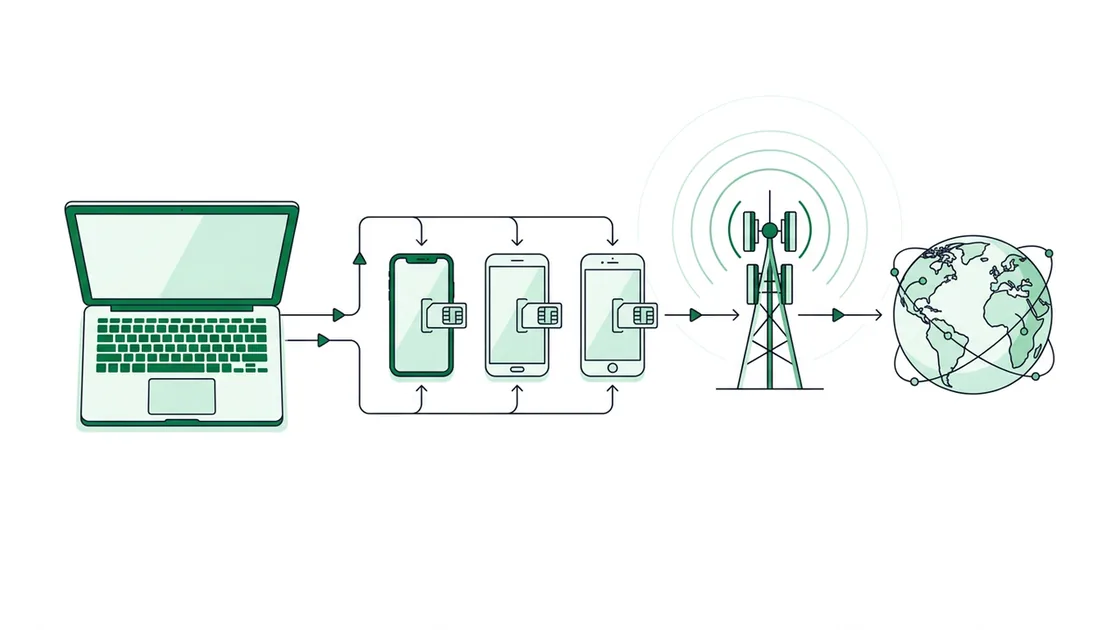
A mobile proxy is an HTTP/HTTPS/SOCKS5 forwarder that sits in front of a real mobile device with a physical SIM. Your request leaves your machine, travels to the device's IP:PORT gateway, exits onto the carrier's radio network (the same path a phone uses to load Instagram), and returns the response to you. Because the exit point is an actual subscriber connection, the destination server assigns it a 100% trust score: it cannot distinguish your traffic from an ordinary phone on AT&T, Three, or Free Mobile.
What happens to a request, step by step?
The mechanics are straightforward once you trace one packet. Authentication happens first, then routing, then the carrier hop. Proxy4G supports two auth modes on every plan — username/password or IP whitelist — and three protocols: SOCKS5, HTTPS, and HTTP. The exit IP is never yours; it always belongs to the carrier.
- You connect to your assigned gateway
HOST:PORTusing your credentials (emailed within minutes of payment). - The proxy device receives the request over its own internet uplink and forwards it through the SIM's mobile data connection.
- The carrier's network NATs the device behind a shared public IP and sends the request to the destination.
- The response retraces the path back through the carrier, the device, and the gateway to you.
Nothing in this chain reveals a datacenter ASN, because there is no datacenter in the path — only a real SIM on a real tower.
Why does CGNAT make these IPs so hard to block?
- CGNAT (Carrier-Grade NAT)
Mobile carriers do not have enough public IPv4 addresses for every subscriber, so they place thousands of phones behind a small pool of shared public IPs using Carrier-Grade NAT. The private address space reserved for this (100.64.0.0/10) is defined in RFC 6598. The practical effect: one public carrier IP fronts a large, constantly shifting crowd of real users.
- The collateral-damage problem
If a website bans the public IP of your mobile proxy, it also bans every genuine customer the carrier has placed behind that same IP — potentially hundreds or thousands of paying subscribers. Anti-fraud teams know this, so they set far higher tolerance thresholds for mobile carrier ranges than for datacenter or even residential ISP ranges. That tolerance is what you are buying.
- Trust score
Anti-bot systems score an IP by its network type, history, and behaviour. Genuine carrier IPs delivered over CGNAT score at the top because they are indistinguishable from ordinary phone traffic. Every Proxy4G IP — dedicated or shared — is a real carrier IP with a 100% trust score.
The hardware behind the network
What does "real SIM hardware" actually mean?
This is the line that separates mobile proxies from cheaper alternatives. Proxy4G does not emulate mobile IPs, lease datacenter ranges, or spoof carrier ASNs. Each exit node is a physical device with a real SIM card on a real carrier — for example AT&T, T-Mobile, or Verizon in the United States; Free Mobile, SFR, Orange, or Bouygues in France; O2 or Vodafone 5G in Germany; Three or EE in the UK.
Because the SIM is genuine, the device negotiates a normal data session with the tower, receives a normal carrier-assigned address, and presents normal mobile network signatures (carrier ASN, mobile DNS, realistic latency). 5G is available on select carriers — US T-Mobile 5G, India Jio 5G, France SFR 5G, Germany Vodafone 5G, Spain Orange 5G and Movistar 5G among them — running on the same 4G/LTE-class infrastructure with higher throughput. The deeper mechanics are covered in what is a mobile proxy and the mobile vs residential vs datacenter comparison.
How does IP rotation work?
- 1
Carrier-driven changes (always on)
Even without you doing anything, mobile IPs shift naturally as the carrier re-NATs sessions and reassigns addresses from its CGNAT pool. This is the baseline churn that keeps mobile ranges fresh.
- 2
Dedicated: rotate on demand
On a dedicated plan you hold an exclusive port, so no one else's traffic touches your device. You can force a fresh IP instantly from the dashboard or via a reset link — useful between accounts or after a soft block.
- 3
Dedicated: rotate on a timer
Prefer hands-off? Set an automatic rotation interval anywhere from 1 to 60 minutes. The device pulls a new carrier IP each cycle without you lifting a finger.
- 4
Shared: rotate every 5 minutes
The budget shared plan auto-rotates the IP every 5 minutes on a fixed cadence. You still get real carrier IPs at 100% trust; you simply don't control the timing or hold an exclusive port.
Dedicated vs shared rotation at a glance
| Dedicated | Shared | |
|---|---|---|
| Port | Exclusive to you | Shared with others |
| Rotate on demand | Yes — instant via dashboard/reset link | No |
| Auto rotation | Every 1–60 min (your choice) | Fixed every 5 min |
| Real carrier IP / trust | Yes — 100% | Yes — 100% |
| Protocols | HTTP, HTTPS, SOCKS5 | HTTP, HTTPS, SOCKS5 |
| From price / month | $27 | $10.80 |
See full per-country pricing on /pricing/. Read the deeper trade-off in our rotating vs dedicated guide.
Confirm the exit is a mobile IP
# Route through your gateway and check the IP you present to the world
curl -x http://USER:PASS@HOST:PORT https://api.ipify.org

# SOCKS5 works the same way
curl --socks5 USER:PASS@HOST:PORT https://api.ipify.org

# Look up the ASN/carrier of the returned IP — it should be a mobile network
curl -x http://USER:PASS@HOST:PORT https://ipinfo.io/jsonHow does payment and onboarding fit in?
Proxy4G is no-KYC: no government ID, no name or address, no phone, no email verification, no card or bank data. Your account is created automatically on your first order. Payment is cryptocurrency only — Bitcoin, Ethereum, Monero, or USDT, plus a wallet/balance top-up — and there are no cards or PayPal. Minutes after payment your credentials (host, port, username, password) arrive by email and you connect. Autonomous AI agents can self-fund and buy through the x402 protocol (USDC on Base), discoverable via /.well-known/agent.json, /openapi.json, and /llms.txt. We do not log destination traffic.
Frequently Asked Questions
Real hardware. Every Proxy4G exit node is a physical device with a genuine SIM card on a live carrier — AT&T, Three, Free Mobile, Jio 5G and others across 18 countries and 43 carriers. Nothing is emulated and no datacenter ranges are leased. The destination server sees an authentic mobile carrier IP delivered over the carrier's own radio network, which is why it scores a 100% trust rating.
Because of carrier-grade NAT. Carriers place thousands of real subscribers behind each shared public IP (RFC 6598, 100.64.0.0/10). Banning that IP would also ban hundreds of paying carrier customers, so anti-fraud systems set much higher tolerance for mobile ranges than for datacenter or residential ISP IPs. You inherit the protection of that crowd.
It depends on your plan. Dedicated lets you rotate instantly on demand from the dashboard or a reset link, or automatically on any interval from 1 to 60 minutes. Shared auto-rotates on a fixed 5-minute cadence. On top of either, carriers also re-assign addresses naturally through CGNAT, so some background churn always occurs.
On dedicated you hold an exclusive port, so only your traffic uses that device and you control rotation timing. On shared you split a device with others to lower cost, and rotation is fixed at every 5 minutes. Both deliver real carrier IPs at 100% trust over HTTP, HTTPS, and SOCKS5; dedicated starts at $27/mo, shared at $10.80/mo.
Send a request through your gateway with curl (curl -x http://USER:PASS@HOST:PORT https://ipinfo.io/json) and inspect the ASN of the returned IP — it should map to a mobile carrier, not a hosting provider. CGNAT addresses (100.64.0.0/10) in a traceroute are another mobile fingerprint. Our how-to-test guide covers the full checklist.
Yes. Autonomous agents can fund a balance and purchase through the x402 payment protocol (scheme "exact", USDC on Base): request a Bearer token from the account endpoint, attempt a top-up to receive an HTTP 402 with accepts data, sign an EIP-3009 USDC authorization, and re-send with the payment header. Capabilities are discoverable at /.well-known/agent.json, /openapi.json, and /llms.txt.